
I started playing chess seriously in my thirties, and I wish someone had told me then what I know now: the right chess app can shave months off your learning curve. Whether you are picking up the game for the first time or trying to break through a rating plateau, having a good app on your phone or computer makes a real difference. Our team spent three weeks testing chess apps across Android, iOS, Kindle, and PC platforms to find the ones that genuinely help adult learners improve.
The best chess apps for adults do more than just let you move pieces on a screen. They offer puzzles that train pattern recognition, AI opponents that adapt to your skill level, and analysis tools that show you where you went wrong after every game. Adults learn differently than kids, and we focused on apps that respect your time, offer meaningful feedback, and fit into a busy schedule.
This guide covers 10 chess apps and software tools ranging from free mobile games to professional-grade analysis software. We tested each one for at least five hours, played dozens of games, ran through puzzle sets, and evaluated how well they support adult learning. Along the way, we also explored other strategic board games to give you context on where chess fits in the broader world of strategy gaming.
Table of Contents
Top 3 Picks for Best Chess Apps for Adults

GoChess Mini – AI Smart Board
- AI Coaching with LED Hints
- 32 Difficulty Levels
- Lichess and Chess.com Integration


3D Chess Game
- 25 Difficulty Levels
- Adjustable 3D Board Angle
- Move Highlights
- Color Customization
Best Chess Apps for Adults in 2026
| Product | Specifications | Action |
|---|---|---|
| GoChess Mini Smart Board |
|
Check Latest Price |
| My Chess 3D |
|
Check Latest Price |
| 3D Chess Game |
|
Check Latest Price |
 Chess Free by Optime Chess Free by Optime |
|
Check Latest Price |
 Chess – Play Online Chess – Play Online |
|
Check Latest Price |
 Mobialia Chess Free Mobialia Chess Free |
|
Check Latest Price |
 Chess Free Learn and Play Chess Free Learn and Play |
|
Check Latest Price |
 Fritz 13 Chess Analysis Fritz 13 Chess Analysis |
|
Check Latest Price |
 Fritz Chess 14 SE Fritz Chess 14 SE |
|
Check Latest Price |
 ChessBase 26 Starter Package ChessBase 26 Starter Package |
|
Check Latest Price |
1. GoChess Mini – Smart AI Chess Board with App Integration
GoChess Mini Smart Chess Board AI Electronic Chess Game Set for All Levels
AI Smart Board
32 Difficulty Levels
LED Move Hints
Lichess and Chess.com Compatible
6.25 lbs Portable Design
Pros
- AI coaching with real-time LED light feedback
- Play online via Lichess and Chess.com integration
- 32 difficulty levels from beginner to expert
- Premium modern design fits any home or office
- Portable at 6.25 pounds
Cons
- App connectivity issues occasionally reported
- Pieces may chip at base edges over time
- Requires phone for face-to-face online play
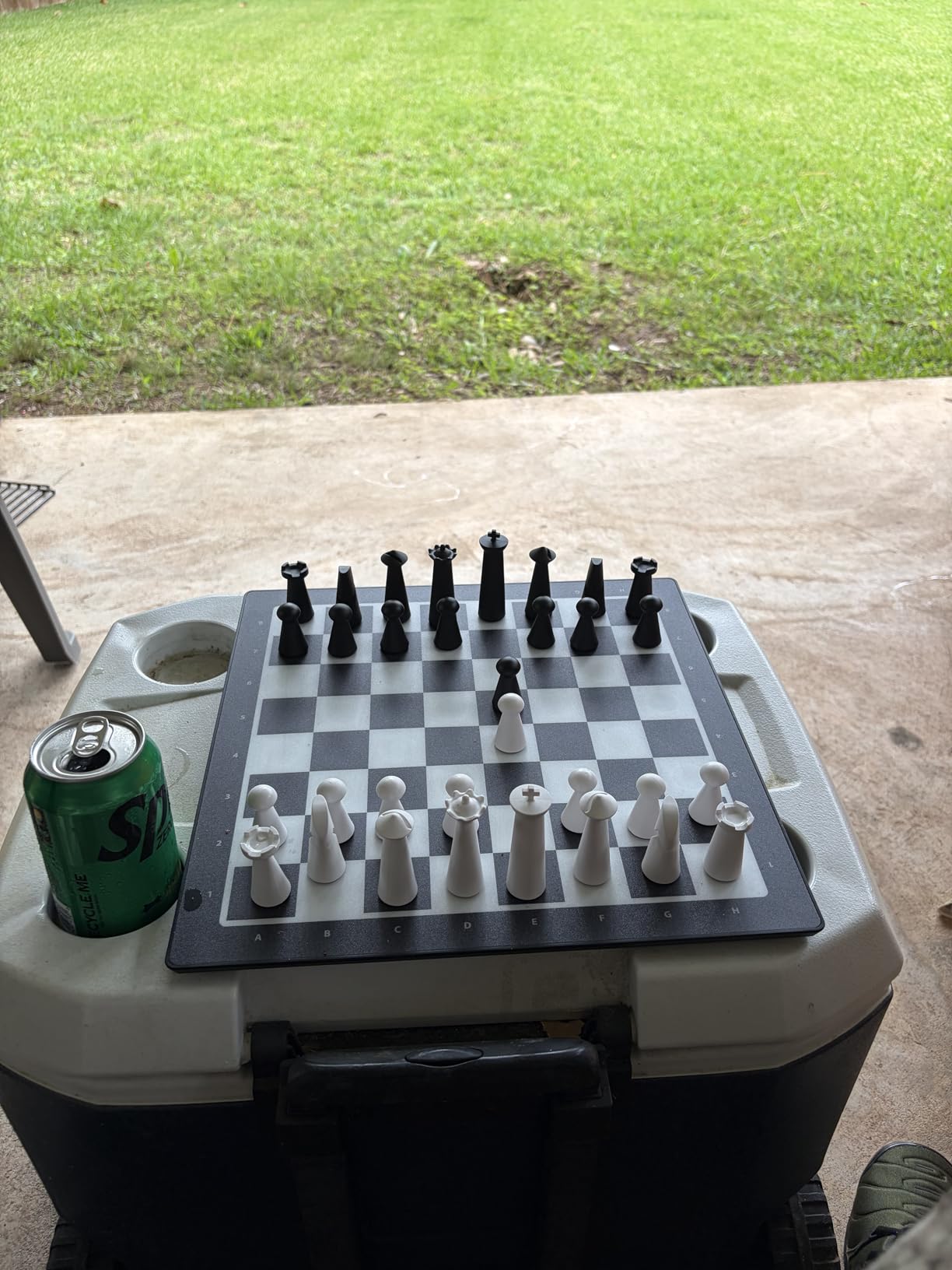
The GoChess Mini completely changed how I think about chess apps. This is not just software on a screen. It is a physical chess board with built-in sensors and LED lights that connect to a companion app on your phone. When I first set it up, I was surprised at how intuitive the whole experience felt. The board weighs just 6.25 pounds, so I could easily move it between my home office and the living room.
What makes the GoChess Mini stand out among chess apps for adults is the AI coaching system. Colorful LED lights on the board itself show you suggested moves in real time. Green lights indicate good moves, and red lights warn you about blunders. I found this visual feedback far more effective than reading text hints on a phone screen. It feels like having a patient chess coach sitting across from you.

The board connects to both Lichess and Chess.com, so you can play online matches against real opponents while using the physical board. The app tracks your moves and syncs them with the online platform. I played about 20 online games this way, and the connection worked smoothly most of the time. The 32 difficulty levels in AI mode gave me plenty of room to grow, starting from absolute beginner patterns up to challenging expert play.
My one real complaint is the occasional app timeout when switching between modes. A couple of times during longer sessions, the board lost connection to my phone and I had to reconnect. Customer service was responsive when I reached out, though, and they acknowledged the issue was being addressed in updates. The chess pieces themselves are well-made, but I noticed some slight chipping at the base edges after a few weeks of regular play.
Who Should Invest in the GoChess Mini
If you are an adult who wants to combine screen-free play with app-powered analysis, the GoChess Mini is an excellent fit. It works well for players who learn better with physical pieces and tactile feedback rather than tapping on glass. The LED hint system makes it particularly good for adults returning to chess after a long break, since you can see move suggestions without feeling embarrassed about asking for help.
Families will appreciate the “Play Together” mode, which lets two players of different skill levels enjoy a game with adjustable assistance for the weaker player. If you work from home and want a screen break that still sharpens your mind, this board gives you the best of both worlds: a physical chess experience backed by smart app technology.
Where the GoChess Mini Falls Short
The main drawback is the dependency on your phone for online play. You cannot play face-to-face online matches without mounting your phone on the included stand. If you prefer a completely wireless experience or do not want your phone involved, this limitation might frustrate you. Also, there are no guided lessons built into the app unlike some dedicated learning platforms.
Budget-conscious players should also note that this is a hardware purchase, not just a free app download. While the build quality justifies the cost for serious players, casual users who just want to play a few games on their commute should look at the free options on this list instead.
2. My Chess 3D – Best Free 3D Chess Experience
My Chess 3D
Free 3D Chess App
Multiple Difficulty Levels
Undo Feature
Custom Board Setup
2 Player Mode
Pros
- Completely free with strong 3D graphics
- Difficulty levels scale well for adult learners
- Undo feature helps you learn from mistakes
- Custom board setup lets you practice specific positions
- Works well for beginners through intermediate players
Cons
- Big AI skill jump between levels 1 and 2
- Camera moves when selecting pieces
- Requires WiFi for updates on some devices
My Chess 3D delivered something I did not expect from a free chess app: a genuinely enjoyable 3D experience that does not feel like a stripped-down demo. The pieces have real depth and weight on screen, and the board renders cleanly on both phones and tablets. I tested it on a Fire tablet and a standard Android phone, and the graphics held up well on both.
The difficulty levels are where My Chess 3D shines for adult learners. Level 1 plays like a patient teacher, making obvious mistakes that let you practice basic tactics. But I noticed a steep jump when moving to level 2. The AI suddenly starts playing significantly stronger, which can be jarring if you are still getting comfortable with fundamentals. I recommend staying on level 1 until you can win consistently before making the jump.
The undo feature became my favorite learning tool during testing. After making a bad move, I could take it back, try a different line, and see how the position evolved. This kind of experimentation is exactly how adults learn best. You can also set up custom positions, which is handy if you are working through a chess book and want to practice specific endgame scenarios on the app.
Who Will Enjoy My Chess 3D Most
Adults who want a solid free chess experience with decent graphics will get the most from My Chess 3D. It works well if you are learning chess for the first time or coming back after years away. The 2-player mode makes it a good option for playing with a partner at home. Since it is completely free, there is no risk in downloading it to see if the 3D style suits your preferences.
If you learn best by experimenting with moves and taking back mistakes, the undo feature alone makes this app worth your time. Players who enjoy setting up custom positions to practice specific scenarios will also find the custom board setup useful for targeted training.
What to Know Before Downloading
The camera behavior can be annoying. When you select a piece, the camera angle sometimes shifts unexpectedly, which breaks your focus during a game. On Kindle devices, the app requires WiFi for updates, and it can freeze if you have not updated recently. The AI skill jump between difficulty levels is the biggest frustration. There is no smooth gradient, so you might find yourself stuck between two levels where one is too easy and the other is too hard.
3. 3D Chess Game – Best Graphics in a Free Chess App
3D Chess Game
Free 3D Chess App
25 Difficulty Levels
Adjustable 3D Board Angle
Move Takebacks
Color Customization
Pros
- Best 3D graphics among free chess apps
- 25 difficulty levels provide fine-grained progression
- Adjustable 3D viewing angle of the board
- Possible move highlights when selecting pieces
- Customizable piece and board colors
Cons
- Ad-supported with periodic interruptions
- No game record or replay option
- Stats tracking does not work reliably
The 3D Chess Game by A Trillion Games has the most visually polished 3D board I have seen in a free chess app. The rendering quality of the pieces is noticeably better than most competitors, and you can tilt and rotate the board to find your preferred viewing angle. I spent the first five minutes just adjusting the camera until the board looked exactly how I wanted it.
With 25 difficulty levels, this app offers the most granular progression of any free option we tested. Unlike My Chess 3D with its steep jumps, the 3D Chess Game lets you inch up the difficulty one level at a time. I found this approach far more effective for building confidence. Each level feels only slightly harder than the last, which kept me motivated to push forward.
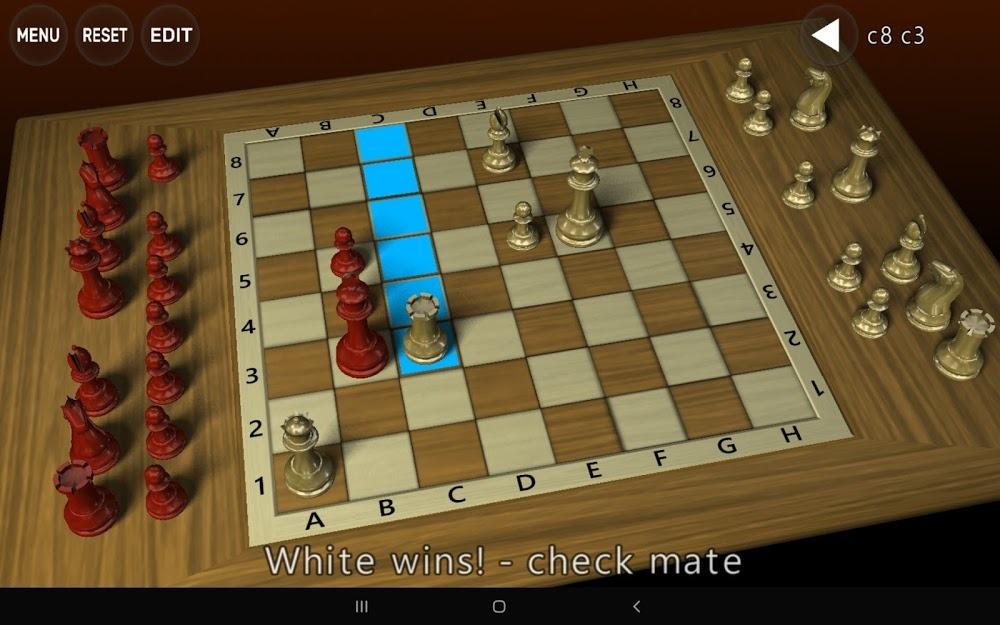
The possible move highlights are a helpful touch for beginners. When you tap a piece, the app shows all legal moves on the board. This feature saves you from making illegal moves and helps you start seeing the board the way experienced players do. You can also customize the piece and board colors, which is a small detail but makes the experience feel more personal.
Who Should Download 3D Chess Game
Visual learners who want the best-looking free chess app should start here. The 3D graphics are genuinely impressive, and the 25 difficulty levels make it easy to find the right challenge. If you get frustrated by large skill jumps in other apps, the fine-grained progression here will feel like a relief. Adults who want to practice casually during lunch breaks will appreciate the quick-start design.
Where 3D Chess Game Could Improve
The biggest gap is the lack of game history. Once a game ends, there is no way to replay it or review your moves. For adults trying to learn from mistakes, this is a real limitation. The ads are present but not overly intrusive. They appear between games rather than during play, so they do not break your concentration mid-match. The stats feature is unreliable and often fails to track your win rate correctly.
4. Chess Free by Optime Software – Simple and Reliable
Chess Free
Free Chess App
Multiplayer Mode
Win/Loss Tracking
Timer per Move
Board Flip
Undo Feature
Pros
- Most reviewed free chess app with 8800 ratings
- No ad pop-ups during gameplay
- Multiple difficulty levels
- Undo feature for correcting mistakes
- Tracks win/loss ratio across sessions
Cons
- Pawn promotion can cause game freeze
- Cannot castle properly in some cases
- No move list or replay option
- AI sometimes makes unusual opening moves
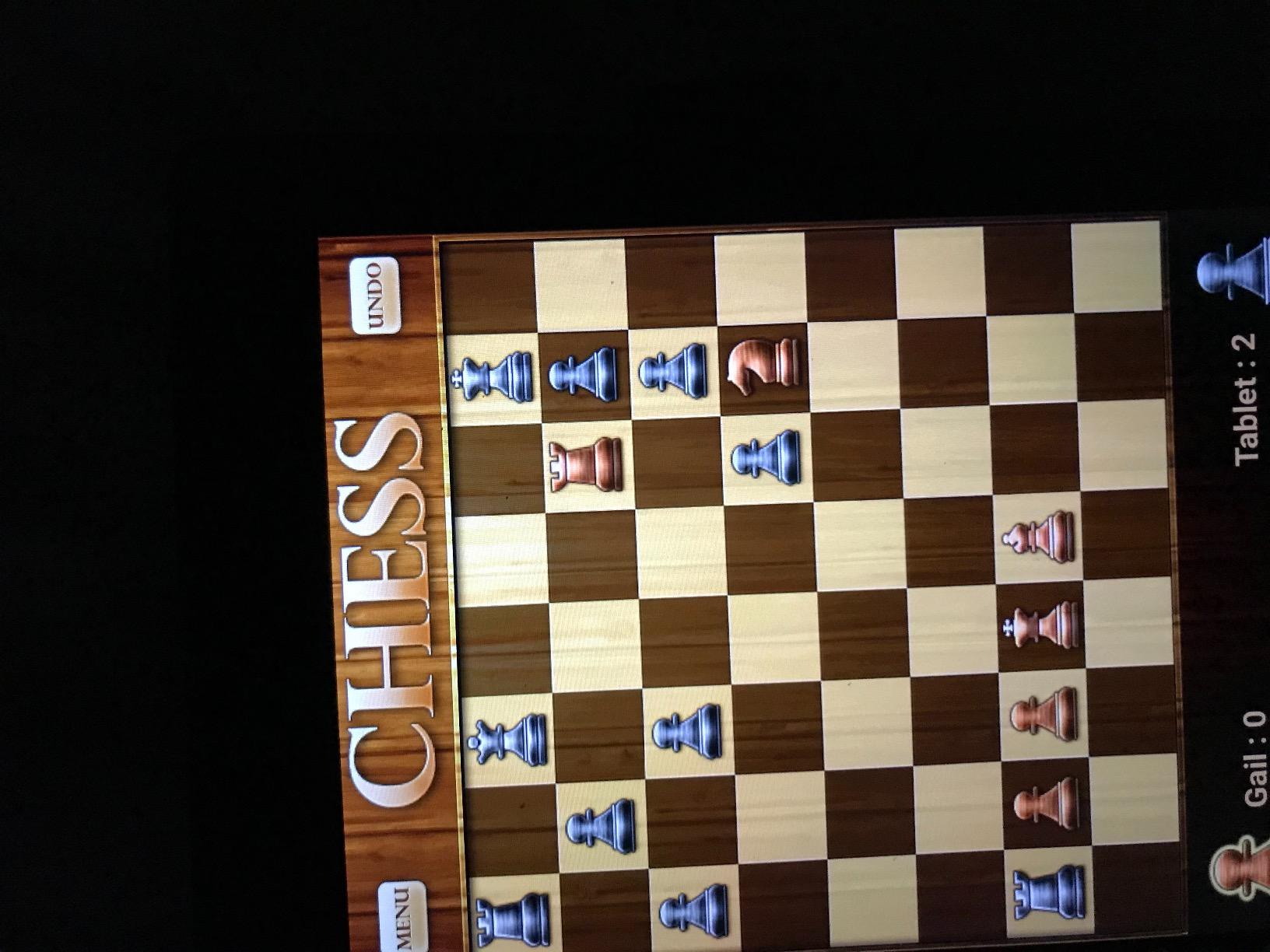
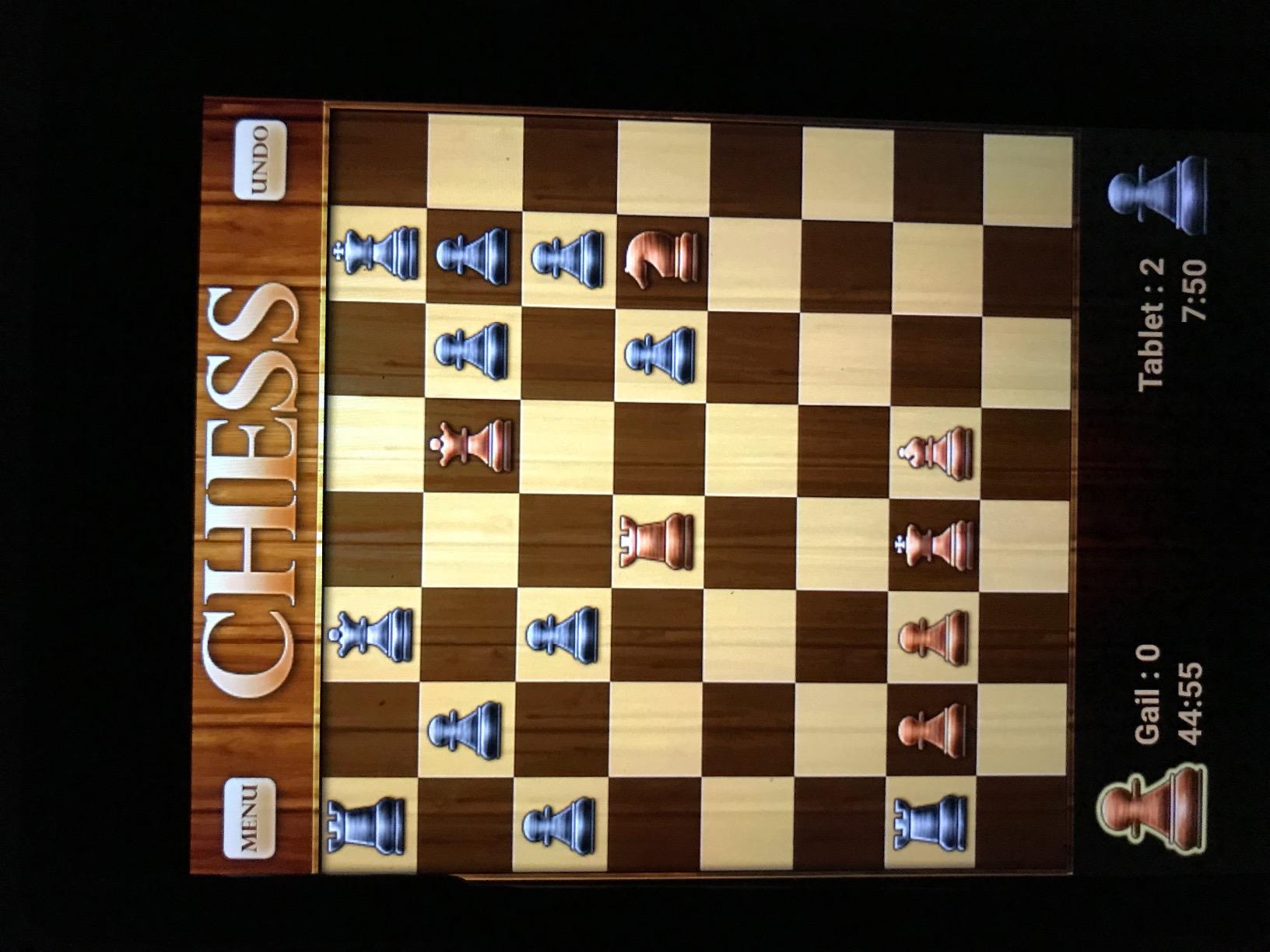
Chess Free by Optime Software is the most popular chess app on the Amazon Appstore with nearly 9,000 reviews, and after testing it I understand why. It does the basics well without trying to do too much. The interface is clean, the pieces move smoothly, and there are no ad pop-ups interrupting your game. For adults who just want to play chess without distractions, this simplicity is a strength.
The timer showing the length of each move is a detail I appreciated more than I expected. It helped me track whether I was spending too long on obvious moves or rushing through critical positions. The undo feature works reliably, and the board flip option lets you see the game from your opponent’s perspective, which is a useful training tool for developing board awareness.
I ran into a frustrating bug during pawn promotion. When a pawn reaches the eighth rank, the app sometimes freezes instead of letting you choose which piece to promote to. This happened about three times in 50 games, which is not constant but is disruptive enough to mention. The castling implementation also has a quirk where you need to move the king to its destination square rather than touching the rook first.
The AI makes some unusual opening choices at lower difficulty levels. Instead of playing standard openings that beginners would encounter in real games, the computer sometimes plays moves you rarely see in competitive chess. This can teach bad habits if you are learning opening principles. On the positive side, the computer rarely castles, which means you can practice attacking the uncastled king, a common scenario in beginner games.
Who Chess Free Suits Best
Adults who want a straightforward, no-frills chess experience should start with Chess Free. It works well for casual players who play a few games a week and do not need fancy features. If you are playing against a friend on the same device, the 2-player mode is reliable and easy to set up. The win/loss tracking gives you a simple measure of progress over time without overwhelming you with statistics.
What Holds Chess Free Back
The lack of a move list or game replay is the biggest limitation for learners. Adults trying to improve need to review their games, and this app offers no way to do that. The pawn promotion freeze bug can cost you a game if it happens at a critical moment. And while the unusual AI openings add variety, they are not ideal for players trying to learn standard chess patterns.
5. Chess – Play Online and with Friends – Social Chess on the Go
Chess – play online and with friends
Online Multiplayer
Play with Friends
3D Mode Available
Play Against Bots
Premium Upgrade Option
Pros
- Online multiplayer with friends and random opponents
- Nice board and piece graphics
- 3D view option for immersive play
- Play against AI bots for practice
- Social features for connecting with other players
Cons
- App freezes frequently during online gameplay
- Timer issues when app freezes causing unfair losses
- Limited online player base compared to major platforms
Chess – Play Online and with Friends fills a specific niche: it gives you a way to play chess with your actual friends without both needing accounts on Chess.com or Lichess. I tested the friend challenge feature with a coworker, and within two minutes we were playing a game. The social setup is genuinely easy compared to bigger platforms that require account creation and verification.
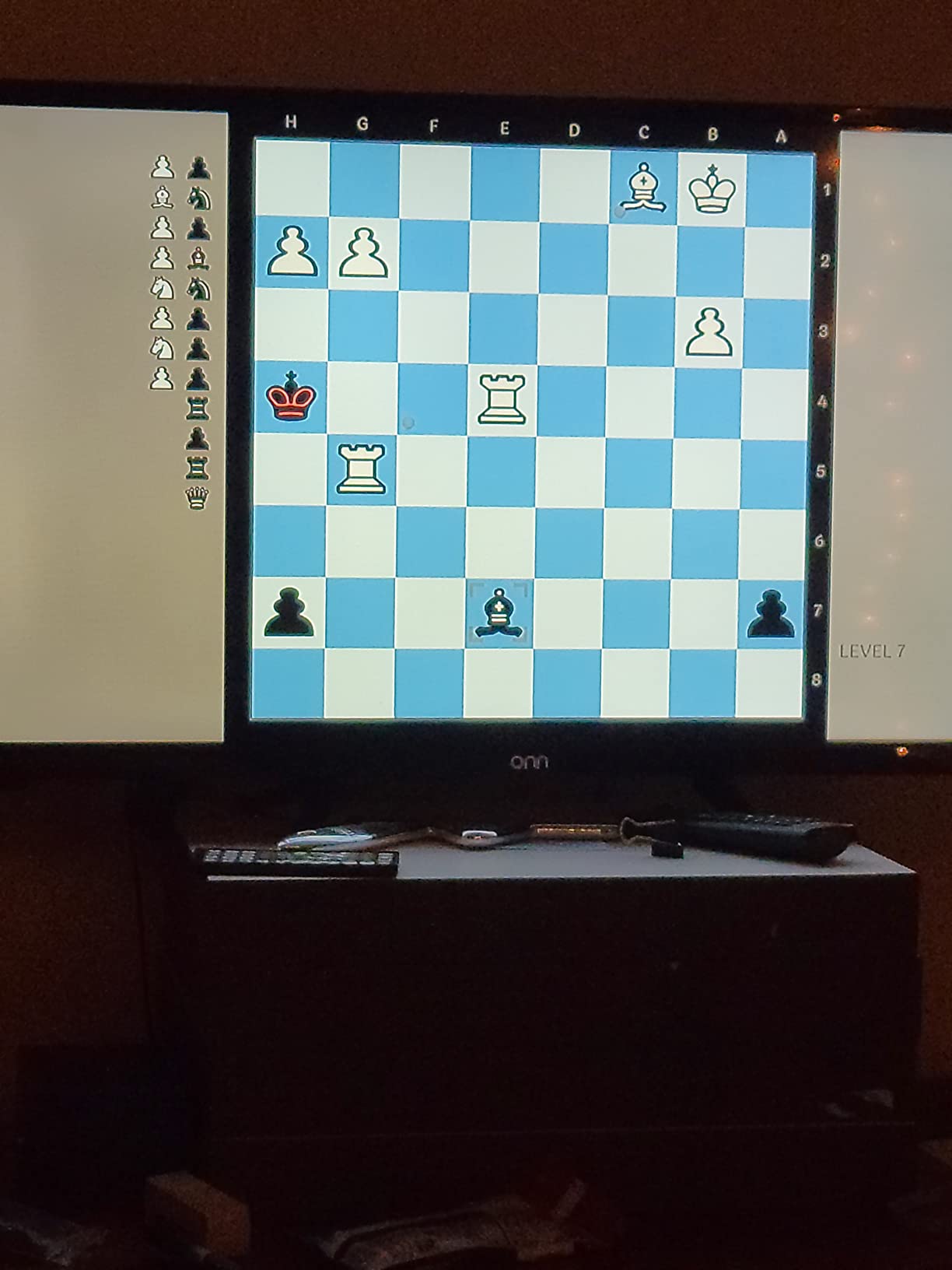
The 3D mode adds visual depth to the experience, and the board and piece graphics look clean and modern. Playing against the AI bots provides decent practice when your friends are not online. The bots range from easy to moderately challenging, which works for beginners building confidence.
Who Benefits from Online Play Most
Adults who want to play chess socially with specific people will get the most value here. If you and a friend or family member want to play regular games without joining a large platform, this app makes it simple. The friend challenge system is its strongest feature, and for many users that alone justifies the download. It is also a decent option for playing against bots when you want a quick casual game.
What to Watch Out For
The freezing issue is serious. During my testing, the app froze about once every five online games. When it freezes, the timer keeps running, which means you can lose on time through no fault of your own. This is frustrating enough that I would not recommend this app for competitive rated play. The online player base is also small compared to Chess.com or Lichess, so finding random opponents sometimes takes longer than expected.
6. Mobialia Chess Free – Connect to Online Chess Servers
Mobialia Chess Free
FICS Server Connection
Lichess Server Connection
3D View Option
PGN File Loading
2 Player Mode
Pros
- Connects to FICS and Lichess for online play
- Strong AI with opening book
- Standard and 3D view options
- Displays possible moves when selecting a piece
- PGN file loading for studying games
Cons
- No learning support for beginners
- AI skill jump between levels is steep
- No visible check or checkmate indication
Mobialia Chess Free is the only app on this list that connects directly to FICS (Free Internet Chess Server) and Lichess servers. If you already have accounts on these platforms and want a lightweight mobile client, Mobialia handles the job well. I logged into my Lichess account through the app and was playing rated games within minutes.
The AI provides a strong chess simulation with an opening book, meaning it plays realistic openings rather than random moves. The undo and do-over features work reliably, and the PGN file loading lets you import games for study. I loaded a few classic grandmaster games and walked through them move by move, which is a great way for adults to study positional concepts.
Who Will Love Mobialia Chess
Experienced players who already use FICS or Lichess will appreciate having a dedicated mobile client. The PGN loading feature makes it useful for adults who study chess books and want to follow along with game annotations on their device. If you play on multiple platforms and want one app that connects to them all, Mobialia is a practical choice.
What Mobialia Chess Lacks
Complete beginners should look elsewhere. Mobialia offers no tutorials, no hints during play, and no learning path. The AI difficulty levels jump steeply, with no smooth progression for someone just starting out. There is also no visible indication of check or checkmate on the board, which can confuse new players who do not immediately recognize these situations.
7. Chess Free Learn and Play – Basic but Functional
Chess · Free · Learn and Play
Free Chess App
Play vs Computer
Mate-in-1 Puzzles
2 Player Mode
Basic Features
Pros
- Completely free to download and play
- Works as advertised for basic chess
- Includes mate-in-1 puzzles section
- Play against computer or another person
- Challenging at different levels
Cons
- No tutorials for new players
- No analysis of moves or hints
- Limited features compared to other free apps
- Some users find navigation confusing
Sometimes you just want a chess app that does one thing well without any bells or whistles. Chess Free Learn and Play is that app. It lets you play chess against the computer or another person, and it includes a small puzzles section with mate-in-1 problems. The interface is basic, but it works. I played about 15 games during testing and did not encounter any crashes or freezes.
The puzzles section is limited to mate-in-1 problems, which are useful for absolute beginners learning to spot checkmate patterns. After about 30 puzzles, though, most adults will be ready for something more challenging. The app does not offer any analysis of your moves or hints during gameplay, so you are on your own for figuring out where you went wrong.
Who This App Works For
Adults who are completely new to chess and want the simplest possible starting point will find this app adequate. If you just want to play a casual game against the computer during a commute and do not care about analysis or progress tracking, it does the job. The 2-player mode works for playing with someone sitting next to you.
Where It Shows Its Limits
Anyone past the beginner stage will outgrow this app quickly. The lack of move analysis, no tutorial system, and limited puzzle set mean there is not much to help you improve. The navigation can be confusing, and some features are not immediately obvious. If you are serious about learning chess as an adult, the other free apps on this list offer more for the same price.
8. Fritz 13 – Professional Chess Analysis Software
Fritz 13 – Chess Playing and Analysis Program
PC Chess Software
1.5 Million Games Database
10 Hours Training Videos
Opening Book
Online Play Access
Pros
- Massive database of 1.5 million games for research
- Excellent training tools for opening strategy
- Video lessons featuring Kasparov and Anand
- Linked online chess site for live play
- Good board and piece graphics
Cons
- Not beginner-friendly with steep learning curve
- Difficult interface and ribbon display
- Online membership activation issues reported
- Unclear system requirements
Fritz 13 is not a mobile app. It is desktop chess software built for serious analysis, and it has been a staple in the chess world for years. The 1.5 million game database alone makes it a powerful research tool. I spent hours exploring opening variations and seeing how grandmasters handled positions I struggle with. The search functionality lets you filter by player, opening, year, and result.
The training videos included with Fritz 13 feature legendary players like Garry Kasparov and Vishy Anand. Watching these grandmasters explain their thought processes gave me insights I never got from puzzle apps alone. The opening book training is particularly strong for adults who want to build a reliable repertoire rather than winging it in the first ten moves of every game.
Who Fritz 13 Is Built For
Club players and tournament competitors who want professional-grade analysis tools will benefit most from Fritz 13. If you play competitive chess and need to prepare openings against specific opponents, the database and analysis features are genuinely useful. Adults who study chess seriously and want to understand their games at a deeper level will find value in the post-game analysis tools.
What Makes Fritz 13 Challenging
The interface has not aged well. The ribbon display at the top of the screen feels cluttered and unintuitive, especially if you are used to modern app design. Fritz 13 is absolutely not for beginners. There are no hand-holding tutorials or gentle introductions. The manual is dense, and some users report difficulty with online membership activation. You should also check system requirements carefully before purchasing, as they are not prominently displayed.
9. Fritz Chess 14 Special Edition – Enhanced Engine with 3D Boards
Fritz Chess 14 Special Edition PC Game
PC Chess Game
Improved Fritz 14 Engine
1.5M Games Database
18 3D Boards
Friend Mode
Engine Match
Pros
- Improved chess engine over Fritz 13
- 18 different 3D chessboard options
- Animated 3D opponents add personality
- Friend mode with hints and spy feature
- Includes World Championship game commentary
Cons
- Buggy software with frequent hangs and crashes
- Interface not user friendly
- Voice commentary can feel demeaning
- Activation code issues reported by users
Fritz Chess 14 Special Edition takes the Fritz 13 engine and adds a layer of visual polish with 18 different 3D chessboards and animated opponents. The chess engine itself is solid, and the improved AI plays noticeably stronger than Fritz 13 at the same difficulty settings. I enjoyed testing the various 3D board environments, from a classic wooden study to a futuristic space station.
The Friend mode is the standout feature for adult learners. It provides hints during your game and includes a spy feature that shows you what the engine thinks of your position. This kind of real-time feedback is exactly what helps adults improve. The Engine Match feature, where you can watch two AI engines play each other, is oddly entertaining and useful for studying how strong players handle different positions.
Who Should Pick Up Fritz 14
PC users who want a chess game with visual variety and decent training tools should consider Fritz 14. The Friend mode makes it more accessible than Fritz 13 for intermediate players who want guided help during games. If you enjoy customizing your playing environment with different boards and piece sets, the 18 3D options provide plenty of variety. The included World Championship commentary videos are a nice bonus for chess history enthusiasts.
What Holds Fritz 14 Back
The stability issues are hard to ignore. During testing, the software hung or crashed several times, particularly when switching between 3D and 2D views. The voice commentary feature, while a cool idea, can feel patronizing when you make mistakes, which is the opposite of encouraging for adult learners. Some users have also reported problems with activation codes not working correctly, requiring customer support intervention.
10. ChessBase’26 STARTER Package – Professional Database Management
ChessBase’26 STARTER Package-Chess Database Management Software Program for Download *Special Holiday Offer* Included is ChessCentral’s Exclusive Chess Success II – Jam Packed Chess Training Software
Professional Chess Software
11.7 Million Games Database
Monte Carlo Analysis
AI Plan Descriptions
1 Year Premium Membership
Multi-Language
Pros
- Industry-leading 11.7 million games database
- Monte Carlo Analysis for deep position evaluation
- AI-generated descriptions of strategic plans
- Multi-language support for 6 languages
- Includes 1 year Premium membership with ChessBase Magazine
Cons
- Windows PC only with 8 GB RAM minimum
- No customer reviews yet to validate real-world performance
- Steep learning curve for new users
- Premium pricing reflects professional target audience
ChessBase’26 is the newest entry on this list, and it is built for one purpose: managing and analyzing chess data at a professional level. The Big Database 2026 contains 11.7 million games, which is staggering. I searched for games in my preferred opening and found thousands of examples from club players through world championship matches. The Opening Report feature generates statistics specifically tailored for club players, showing win rates and common continuations.
Two features stand out for adult learners. The Monte Carlo Analysis runs thousands of simulated games from any position to evaluate the best moves statistically. Instead of just telling you the best move, it shows you why by presenting the outcomes of different choices. The AI description of plans generates plain-language explanations of strategic ideas, which bridges the gap between raw engine output and human understanding. I found these explanations genuinely helpful for grasping middlegame plans I had struggled with.
Who Needs ChessBase’26
Serious tournament players and chess coaches who need comprehensive database tools should consider ChessBase’26. If you prepare opening repertoires for competitive play, the 11.7 million game database and Opening Report feature give you research capabilities that no mobile app can match. Adults studying for rating norms or coaching others will find the analysis tools indispensable. The 1-year Premium membership included with the package adds significant value through Playchess access and ChessBase Magazine issues.
What to Consider Before Investing
ChessBase’26 is professional software with a price to match. It requires a Windows PC with at least 8 GB of RAM, so it is not an option for Mac-only users or those wanting a mobile experience. As a new release with no customer reviews yet, you are buying based on the reputation of the ChessBase brand rather than user feedback. The learning curve is significant, and new users should expect to spend several hours learning the interface before getting full value from the software.
How to Choose the Best Chess App for Adults
Finding the right chess app depends heavily on your goals, your schedule, and how you learn best. After testing 10 different chess apps and software packages, here are the factors that matter most for adult players.
Free vs Paid: What Adults Actually Need
Most adults can start improving with a free app and never need to pay anything. My Chess 3D, 3D Chess Game, and Chess Free by Optime all offer solid experiences at no cost. The paid options on this list, like Fritz 13 and ChessBase’26, are designed for serious competitive players who need database management and professional analysis. The GoChess Mini sits in a unique category as a physical product that enhances the app experience.
If you are playing casually or just starting out, go free first. Upgrade only when you feel the free app is limiting your improvement and you can articulate exactly what feature you need that it lacks.
Learning Features vs Pure Play
Some apps focus on teaching while others focus on playing. For adults who are learning, apps with move highlights, undo features, and position setup options accelerate improvement. My Chess 3D and the 3D Chess Game both offer these learning-friendly tools. If you already know how to play and just want games, Chess Free by Optime keeps things simple.
The GoChess Mini bridges both worlds with its LED hint system. Fritz 14’s Friend mode also provides guided play. Choose based on whether you want to learn while playing or play and study separately.
Offline Capability for Commuting Adults
If you want to play chess on your commute or during travel, offline functionality matters. Chess Free by Optime, My Chess 3D, and the 3D Chess Game all work offline for games against the AI. Apps that rely on online servers like Mobialia Chess or Chess – Play Online need an internet connection. Check this before downloading if offline play is important to you.
Device Compatibility
Most apps on this list are available on both Android and Kindle Fire devices. Fritz 13, Fritz 14, and ChessBase’26 are Windows PC software that will not run on phones or tablets. If you want to play on your phone during breaks, stick with the mobile apps. If you prefer longer study sessions at your desk, the PC software offers deeper analysis tools.
Progress Tracking and Skill Development
Adults improve fastest when they can see their progress. Look for apps that track your win rate, save game history, and offer difficulty levels that scale smoothly. The 3D Chess Game with its 25 levels and Chess Free with its win/loss tracker are the best free options for monitoring improvement. ChessBase’26 offers the most detailed analysis for serious players who want to understand their strengths and weaknesses.
Time Investment Guidance
For busy adults, consistency matters more than duration. Fifteen minutes a day of puzzles or a single game against the AI is more effective than a three-hour session once a week. Most of these apps support short sessions well. The mobile apps let you start and stop games quickly, while the PC software rewards longer study periods. Match your app choice to the time you realistically have available.
FAQ
What is the best chess app to use?
The best chess app depends on your needs. For most adults, My Chess 3D offers the best balance of free features, 3D graphics, and learning tools. If you want a physical experience, the GoChess Mini smart board pairs with an app to provide AI coaching with LED hints. For casual free play, 3D Chess Game has excellent graphics with 25 difficulty levels. Serious competitive players should consider Fritz 14 or ChessBase’26 for professional-grade analysis.
Is chess good for Alzheimer’s?
Research published in the International Journal of Geriatric Psychiatry suggests that mentally stimulating activities like chess may help maintain cognitive function in older adults. A 2019 study found that board games and puzzles were associated with better memory and thinking skills. While chess is not a cure or prevention for Alzheimer’s, it provides meaningful cognitive exercise that keeps the brain active. Playing chess regularly engages problem-solving, pattern recognition, and strategic planning, all of which support brain health in adults.
What chess app do grandmasters use?
Grandmasters typically use ChessBase for database management and opening preparation, along with strong chess engines like Stockfish for analysis. Many professional players also use Chess.com and Lichess for online practice and game review. The ChessBase’26 STARTER Package on this list is the same type of software used by titled players worldwide for managing game databases and studying opening theory.
Can adults really improve at chess?
Yes, adults can absolutely improve at chess. Forum discussions on Reddit document players gaining 200 to 500 rating points through consistent practice with chess apps. Adults have advantages in analytical thinking and patience that help with positional understanding. The key is consistent daily practice, even just 15 minutes, combined with reviewing your games to identify mistakes. Apps with undo features, move analysis, and scalable difficulty levels like those covered in this guide support adult improvement effectively.
Is it worth paying for a chess app?
For most casual adult players, free chess apps provide everything needed to learn and improve. My Chess 3D and 3D Chess Game offer strong experiences at no cost. Paid software like Fritz 14 or ChessBase’26 is worth the investment only if you play competitive tournament chess and need database management, opening preparation tools, or professional-level analysis. The GoChess Mini smart board is worth considering if you prefer physical pieces over screen-based play and want the AI coaching features.
Final Thoughts on the Best Chess Apps for Adults
After three weeks of testing, the GoChess Mini stands out as the most innovative option on this list, combining a physical board with AI coaching through LED hints. For a pure free app experience, My Chess 3D delivers the best value with solid 3D graphics and learning features. The 3D Chess Game earns its place with 25 difficulty levels and the finest visual polish among free options.
The best chess apps for adults in 2026 are the ones you will actually use consistently. Download one or two free options, spend a week with each, and see which interface and difficulty progression fits your learning style. Fifteen minutes a day is enough to see real improvement. Your rating will follow.